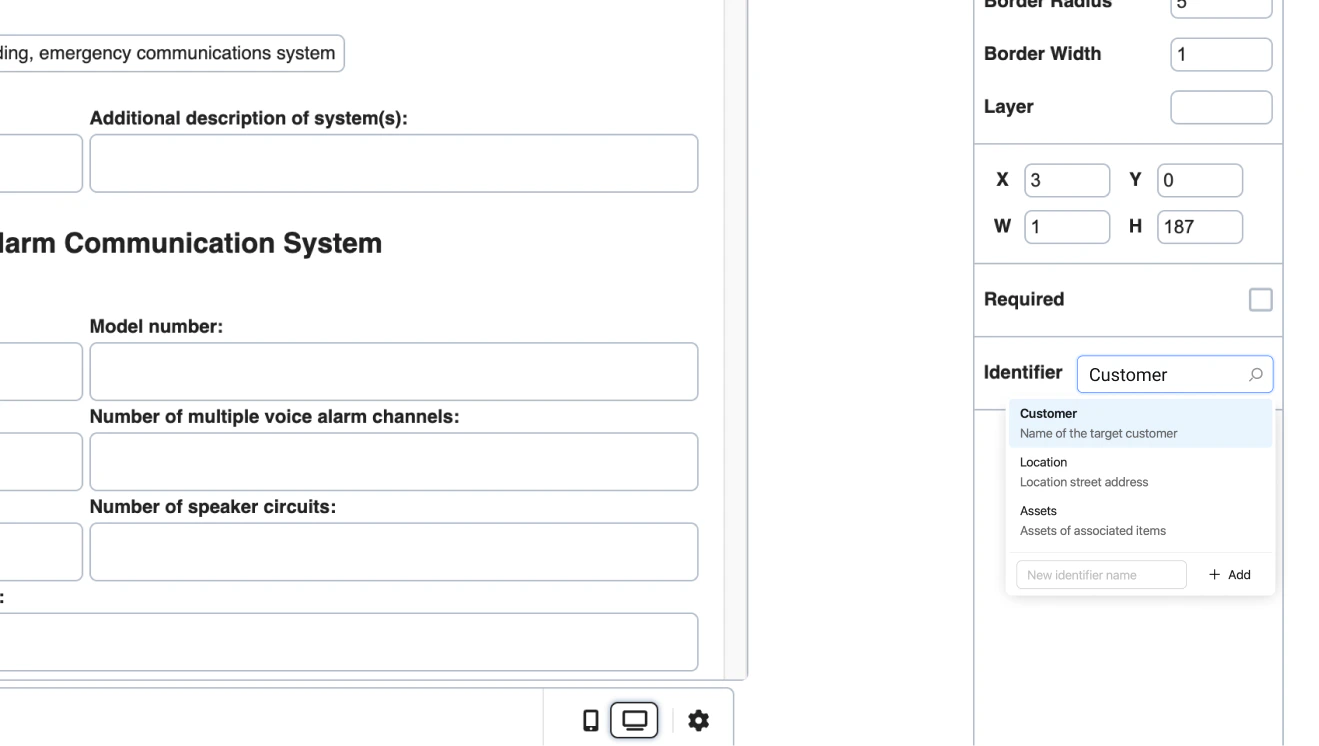
 ### 2. Metadata Settings
Custom controls that save data to field metadata:
| Type | Use Case | Properties |
| ---------- | ---------------- | -------------------------------- |
| `text` | Short text | `label`, `key`, `value`, `addon` |
| `textarea` | Long text | `label`, `key`, `value` |
| `number` | Numeric values | `label`, `key`, `value`, `addon` |
| `checkbox` | Yes/No options | `label`, `key`, `value` |
| `button` | Actions | `label`, `key`, `color` |
| `divider` | Visual separator | `key` only |
**Metadata Example:**
```jsx theme={null}
metadata: {
options: [
{
type: FieldSettingsMetadataTypes.checkbox,
label: 'Require Photo Uploads',
description: 'Should a photo be required?',
key: 'required'
},
{
type: FieldSettingsMetadataTypes.number,
label: 'Quantity',
description: 'How many photos are required?',
key: 'count'
},
{
type: FieldSettingsMetadataTypes.divider,
key: 'divider'
},
{
type: FieldSettingsMetadataTypes.checkbox,
label: 'Failing Option',
key: 'fail'
}
]
}
```
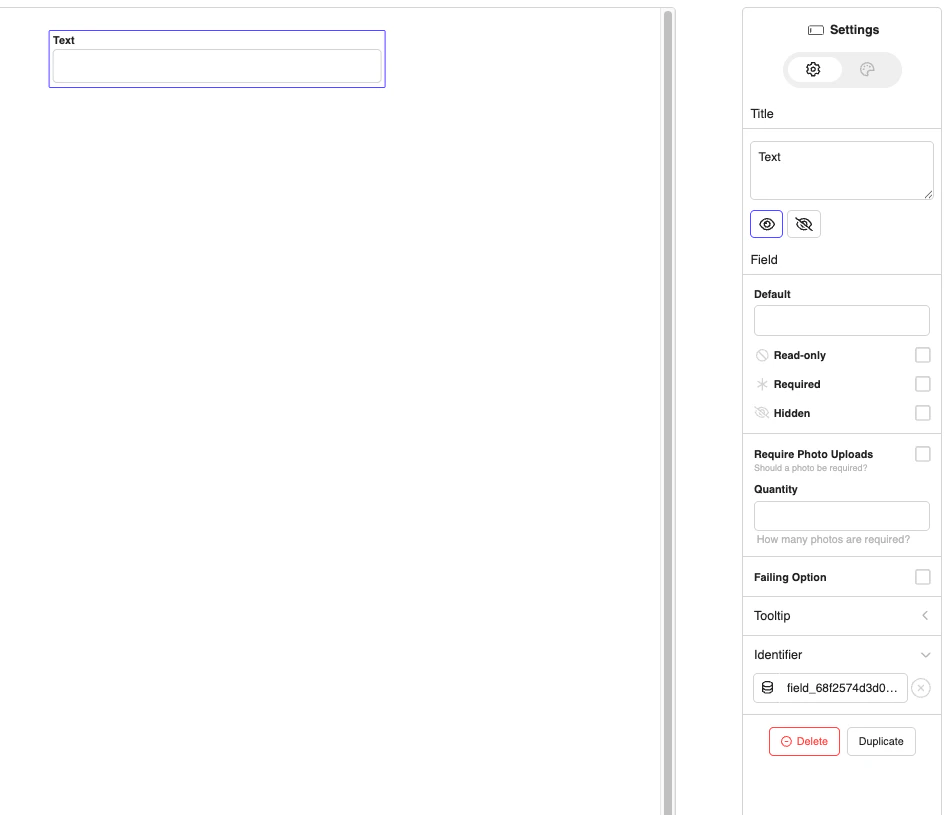
**Output:**
### 2. Metadata Settings
Custom controls that save data to field metadata:
| Type | Use Case | Properties |
| ---------- | ---------------- | -------------------------------- |
| `text` | Short text | `label`, `key`, `value`, `addon` |
| `textarea` | Long text | `label`, `key`, `value` |
| `number` | Numeric values | `label`, `key`, `value`, `addon` |
| `checkbox` | Yes/No options | `label`, `key`, `value` |
| `button` | Actions | `label`, `key`, `color` |
| `divider` | Visual separator | `key` only |
**Metadata Example:**
```jsx theme={null}
metadata: {
options: [
{
type: FieldSettingsMetadataTypes.checkbox,
label: 'Require Photo Uploads',
description: 'Should a photo be required?',
key: 'required'
},
{
type: FieldSettingsMetadataTypes.number,
label: 'Quantity',
description: 'How many photos are required?',
key: 'count'
},
{
type: FieldSettingsMetadataTypes.divider,
key: 'divider'
},
{
type: FieldSettingsMetadataTypes.checkbox,
label: 'Failing Option',
key: 'fail'
}
]
}
```
**Output:**
 ### 3. Table Columns Settings
Customize table field columns:
```jsx theme={null}
tableColumns: {
types: ['text','dropdown', 'image', 'number' 'multiSelect', 'date', 'block', 'barcode','signature'],
identifier: {
label: 'Col Identifier',
options: [
{
type: 'text',
title: 'Deficiencies',
description: 'Details about identifer for table',
value: 'table_customidentifierselector'
}
]
},
metadata: {
options: [
{
type: 'number',
label: 'Require Photo Col',
description: 'Should a photo be required?',
key: 'required'
}
]
},
options: {
metadata: {
options: [
{
type: 'checkbox',
label: 'Failing Option',
description: 'Trigger deficiency capture.',
key: 'failure'
}
]
}
}
}
```
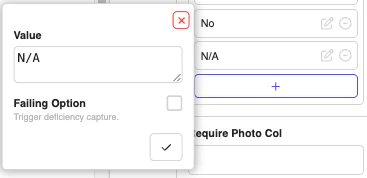
### **Metadata for columns:**
### 3. Table Columns Settings
Customize table field columns:
```jsx theme={null}
tableColumns: {
types: ['text','dropdown', 'image', 'number' 'multiSelect', 'date', 'block', 'barcode','signature'],
identifier: {
label: 'Col Identifier',
options: [
{
type: 'text',
title: 'Deficiencies',
description: 'Details about identifer for table',
value: 'table_customidentifierselector'
}
]
},
metadata: {
options: [
{
type: 'number',
label: 'Require Photo Col',
description: 'Should a photo be required?',
key: 'required'
}
]
},
options: {
metadata: {
options: [
{
type: 'checkbox',
label: 'Failing Option',
description: 'Trigger deficiency capture.',
key: 'failure'
}
]
}
}
}
```
### **Metadata for columns:**
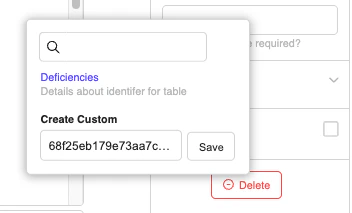
 ### Custom column identifier
 ### 4. Options Settings
Customize dropdown/select field options:
```jsx theme={null}
options: {
metadata: {
options: [
{
type: FieldSettingsMetadataTypes.checkbox,
label: 'Failing Option',
description: 'Trigger deficiency capture.',
key: 'failure'
}
]
}
}
```
## Hiding Settings
Hide default settings by setting them to `false`:
```jsx theme={null}
const fieldSettings = {
field: {
title: false, // Hide field title
required: false, // Hide required checkbox
placeholder: false, // Hide placeholder input
styles: {
fontSize: false, // Hide font size
fontColor: false, // Hide font color
backgroundColor: false // Hide background color
}
},
page: {
upload: false, // Hide page background upload
duplicate: false // Hide page duplication
}
};
```
## Advanced Features
### File Upload Handlers
```jsx theme={null}
onFileUploadAsync: async (params, fileUploads) => {
console.log('onFileUploadAsync: ', params, fileUploads);
return {
_id: new Date().getTime(),
url: 'https://s3.amazonaws.com/docspace.production.documents/6702de67c6ba43a423ca035f/documents/template_680bc498b6890a1324423764/680fbf96e97c7b42ec58f988-1745862550459.jpg'
};
},
onFileClick: async (params, urlObject) => {
console.log('onFileClick: ', params, urlObject);
},
onFileDelete: async (params, urlObject) => {
console.log('onFileDelete: ', params, urlObject);
}
```
### Global Settings
```jsx theme={null}
const fieldSettings = {
autoResize: false, // Set to true to see supported fields auto resize
field: {
systemFilePicker: false // Disable system file picker
}
};
```
## Complete Example
Here's the exact fieldSettings example from JoyDoc.stories.js:
```jsx theme={null}
import React, { useState } from "react";
import { JoyDoc } from "@joyfill/components";
import FieldSettingsMetadataTypes from "../constants/FieldSettingsMetadataTypes";
import fieldColumnTypes from "../constants/FieldTableColumnTypes";
function CompleteFieldSettingsExample() {
const [document, setDocument] = useState(initialDocument);
const fieldSettings = {
autoResize: false, // Set to true to see supported fields auto resize
page: {
metadata: {
options: [
{
type: FieldSettingsMetadataTypes.checkbox,
label: "Require Photo",
description: "Should a photo be required?",
key: "required",
},
],
},
},
field: {
systemFilePicker: false,
onFileUploadAsync: async (params, fileUploads) => {
console.log("onFileUploadAsync: ", params, fileUploads);
return {
_id: new Date().getTime(),
url: "https://s3.amazonaws.com/docspace.production.documents/6702de67c6ba43a423ca035f/documents/template_680bc498b6890a1324423764/680fbf96e97c7b42ec58f988-1745862550459.jpg",
};
},
onFileClick: async (params, urlObject) => {
console.log("onFileClick: ", params, urlObject);
},
onFileDelete: async (params, urlObject) => {
console.log("onFileDelete: ", params, urlObject);
},
identifier: {
label: "Identifier",
options: [
{
title: "Plain Identifier Option",
description: "Identifier details for text",
value: "customer_text_customidentifierselector",
},
],
},
metadata: {
options: [
{
type: 'checkbox',
label: "Require Photo Uploads",
description: "Should a photo be required?",
key: "required",
},
{
type: 'number',
label: "Quantity",
description: "How many photos are required?",
key: "count",
},
{
type: 'divider',
key: "divider",
},
{
type: 'checkbox',
label: "Failing Option",
key: "fail",
},
],
},
options: {
metadata: {
options: [
{
type: 'checkbox',
label: "Failing Option",
description: "Trigger deficiency capture.",
key: "failure",
},
],
},
},
tableColumns: {
types: [
'text',
'dropdown',
'image',
'number',
'multiSelect',
'date',
'block',
'barcode',
'signature',
],
identifier: {
label: "Col Identifier",
options: [
{
type: "text",
title: "Deficiencies",
description: "Details about identifer for table",
value: "table_customidentifierselector",
},
],
},
metadata: {
options: [
{
type: 'number',
label: "Require Photo Col",
description: "Should a photo be required?",
key: "required",
},
],
},
options: {
metadata: {
options: [
{
type: 'checkbox',
label: "Failing Option",
description: "Trigger deficiency capture.",
key: "failure",
},
],
},
},
},
},
};
const handleChange = (changelogs, updatedDoc) => {
console.log("Document changed:", changelogs);
setDocument(updatedDoc);
};
return (
### 4. Options Settings
Customize dropdown/select field options:
```jsx theme={null}
options: {
metadata: {
options: [
{
type: FieldSettingsMetadataTypes.checkbox,
label: 'Failing Option',
description: 'Trigger deficiency capture.',
key: 'failure'
}
]
}
}
```
## Hiding Settings
Hide default settings by setting them to `false`:
```jsx theme={null}
const fieldSettings = {
field: {
title: false, // Hide field title
required: false, // Hide required checkbox
placeholder: false, // Hide placeholder input
styles: {
fontSize: false, // Hide font size
fontColor: false, // Hide font color
backgroundColor: false // Hide background color
}
},
page: {
upload: false, // Hide page background upload
duplicate: false // Hide page duplication
}
};
```
## Advanced Features
### File Upload Handlers
```jsx theme={null}
onFileUploadAsync: async (params, fileUploads) => {
console.log('onFileUploadAsync: ', params, fileUploads);
return {
_id: new Date().getTime(),
url: 'https://s3.amazonaws.com/docspace.production.documents/6702de67c6ba43a423ca035f/documents/template_680bc498b6890a1324423764/680fbf96e97c7b42ec58f988-1745862550459.jpg'
};
},
onFileClick: async (params, urlObject) => {
console.log('onFileClick: ', params, urlObject);
},
onFileDelete: async (params, urlObject) => {
console.log('onFileDelete: ', params, urlObject);
}
```
### Global Settings
```jsx theme={null}
const fieldSettings = {
autoResize: false, // Set to true to see supported fields auto resize
field: {
systemFilePicker: false // Disable system file picker
}
};
```
## Complete Example
Here's the exact fieldSettings example from JoyDoc.stories.js:
```jsx theme={null}
import React, { useState } from "react";
import { JoyDoc } from "@joyfill/components";
import FieldSettingsMetadataTypes from "../constants/FieldSettingsMetadataTypes";
import fieldColumnTypes from "../constants/FieldTableColumnTypes";
function CompleteFieldSettingsExample() {
const [document, setDocument] = useState(initialDocument);
const fieldSettings = {
autoResize: false, // Set to true to see supported fields auto resize
page: {
metadata: {
options: [
{
type: FieldSettingsMetadataTypes.checkbox,
label: "Require Photo",
description: "Should a photo be required?",
key: "required",
},
],
},
},
field: {
systemFilePicker: false,
onFileUploadAsync: async (params, fileUploads) => {
console.log("onFileUploadAsync: ", params, fileUploads);
return {
_id: new Date().getTime(),
url: "https://s3.amazonaws.com/docspace.production.documents/6702de67c6ba43a423ca035f/documents/template_680bc498b6890a1324423764/680fbf96e97c7b42ec58f988-1745862550459.jpg",
};
},
onFileClick: async (params, urlObject) => {
console.log("onFileClick: ", params, urlObject);
},
onFileDelete: async (params, urlObject) => {
console.log("onFileDelete: ", params, urlObject);
},
identifier: {
label: "Identifier",
options: [
{
title: "Plain Identifier Option",
description: "Identifier details for text",
value: "customer_text_customidentifierselector",
},
],
},
metadata: {
options: [
{
type: 'checkbox',
label: "Require Photo Uploads",
description: "Should a photo be required?",
key: "required",
},
{
type: 'number',
label: "Quantity",
description: "How many photos are required?",
key: "count",
},
{
type: 'divider',
key: "divider",
},
{
type: 'checkbox',
label: "Failing Option",
key: "fail",
},
],
},
options: {
metadata: {
options: [
{
type: 'checkbox',
label: "Failing Option",
description: "Trigger deficiency capture.",
key: "failure",
},
],
},
},
tableColumns: {
types: [
'text',
'dropdown',
'image',
'number',
'multiSelect',
'date',
'block',
'barcode',
'signature',
],
identifier: {
label: "Col Identifier",
options: [
{
type: "text",
title: "Deficiencies",
description: "Details about identifer for table",
value: "table_customidentifierselector",
},
],
},
metadata: {
options: [
{
type: 'number',
label: "Require Photo Col",
description: "Should a photo be required?",
key: "required",
},
],
},
options: {
metadata: {
options: [
{
type: 'checkbox',
label: "Failing Option",
description: "Trigger deficiency capture.",
key: "failure",
},
],
},
},
},
},
};
const handleChange = (changelogs, updatedDoc) => {
console.log("Document changed:", changelogs);
setDocument(updatedDoc);
};
return (
This example demonstrates the exact fieldSettings from JoyDoc.stories.js